






Curious about the RGB vs CMYK color systems? Scroll down to discover their key differences, which system is better for web designs, and some interesting FAQs.
SUMMARISE WITH:


Understanding the color system is crucial when it comes to designing a visually appealing website. A website’s color combination can greatly impact the user perception, influencing emotions, brand identity, and much more.
The two color models that are widely used by developers and graphic designers are RGB (Red, Green, Blue), which is primarily used for digital display, and CMYK (Cyan, Magenta, Yellow, Key/Black), a standard for print materials, but can also be used in web design.
In this blog post, we are going to discuss both these color models in detail, eventually helping you decide which one to use for your upcoming web design project.
Table of Contents:
- Overview of RGB & CMYK
- Major Differences Between RGB and CMYK
- Choosing the Best Color System for Web Design
- How You Can Transform CMYK to RGB Easily
- Conclusion
- Frequently Asked Questions
- Next Steps
Overview of RGB & CMYK
In web design, color significantly influences user engagement, emotions, and ultimately, accessibility. RGB and CMYK are two popular color systems that are preferred globally.
So, as a designer, it may become difficult for you to decide which one is suitable for your project. To help you out, here’s a comprehensive overview of both these color systems as well as their uses.
RGB
Red, Green, Blue (RGB) is a color additive system based on light. It combines red, green, and blue colors in varying intensities to create a vast spectrum of colors. The system primarily relies on the emission of light; that’s why it is used as a default color system for all electronic displays nowadays.
One more reason behind its wide usage is that, using only three colors, RGB is capable of creating millions of color combinations.
Uses
As mentioned earlier, RGB has become the standard color for digital displays. It is now playing a key role in developing immersive web designs, graphic design, applications, videos, and many more.
Since electronic devices or machines work by emitting light, RGB is a perfect choice for crafting high-contrast and vibrant visuals when it comes to such devices. This increases the chances of capturing the viewer's attention for a prolonged period.
How to Apply It
Since RGB is an additive color model, it creates colors by adding different intensities of Red, Green, and Blue light. The more light added, the brighter the resulting color.
For instance, if Red, Green, and Blue are combined at their full intensity, a pure white color will be produced. Whereas, if no intensity or light is emitted, the result will be black.
So, by varying the intensity of each color, web designers can create millions of color combinations to make their designs stand out as unique and attractive.

CMYK:
CMYK is basically a subtractive color model/system that is primarily based on ink. It works by subtracting the brightness from white, layer by layer, to produce colors. CMYK is also referred to as process color or four color model..
Uses
For printing, CMYK is the most preferred color model. Many commercial organizations and local businesses use it to produce printed physical materials such as:
- Business cards
- Packaging
- Banners
How to Apply It
The working mechanism of CMYK relies on ink mixing to produce different shades. Both ink and pigments are used to ensure 100% accurate color reproduction on print and other surfaces.

Here is the breakdown of its entire work:
- CMYK works with four main colors: Cyan, Magenta, Yellow, and Key (Black).
- Each color is layered on a white surface, subtracting brightness as more ink is added.
- The combination of Cyan, Magenta, and Yellow produces a dark brownish shade, whereas, Black (Key) is used to enhance depth and contrast.
Now that you have a detailed idea of both these popular color systems, it’s time to understand some of the notable differences between them.
Major differences between RGB and CMYK
There are numerous key differences between RGB and CMYK, some of the notable ones are mentioned in the table below.
|
Parameters |
RGB |
CMYK |
|---|---|---|
|
Use Cases |
Primarily used for digital designs, i.e., web, TV, etc. |
Often used for printed designs such as T-shirts, physical banners, or business cards. |
|
Process |
In RGB, light is added to create colors. Red, green, and blue are used in different intensities. |
In CMYK, a pigment creates the color and mixes in the subtractive process. Cyan, Magenta, Yellow, and Key/Black are the primary colors. |
|
Color Scope |
RGB is capable of creating over 16.7 million color combinations. |
CMYK can create 16,000 colors. |
|
File Size |
RGB often has a small file size. |
CMYK usually results in a large file size. |
|
Vibrancy |
RGB colors usually appear more vibrant and bright. |
CMYK colors appear dull and less vivid when compared to RGB. |
Which is the Best Color System for Web Design?
When it comes to web design, the widely accepted color system is RGB and there are multiple reasons behind this selection. The primary one is that RGB is specifically designed for digital use cases such as TVs and websites, and using this color model ensures better quality visuals on digital interfaces.
Besides this, it is capable of creating millions of color combinations with just three primary colors, making it very reliable and versatile. Another significant advantage of RGB is its compatibility with various web design tools and programming languages. This makes it much easier for designers to achieve color consistency and perform color manipulation seamlessly.
How to Easily Transform CMYK to RGB
If you have used CMYK color to design posters, flyers, etc., for a brand and are now being asked to make their digital counterparts, you’ll need to convert these colors to RGB to achieve the same design look. Fortunately, this conversion can be done with minimal effort, all thanks to the advancements in technology. All you need to do is to follow the steps mentioned below.
1. Find a CMYK to RGB Converter
On the internet, you can easily find a huge variety of CMYK to RGB converters that help seamlessly perform the color conversion. These are available for free and often have a simple user interface so that users with no technical knowledge can easily utilize them. You can go with any based on your personal preferences.
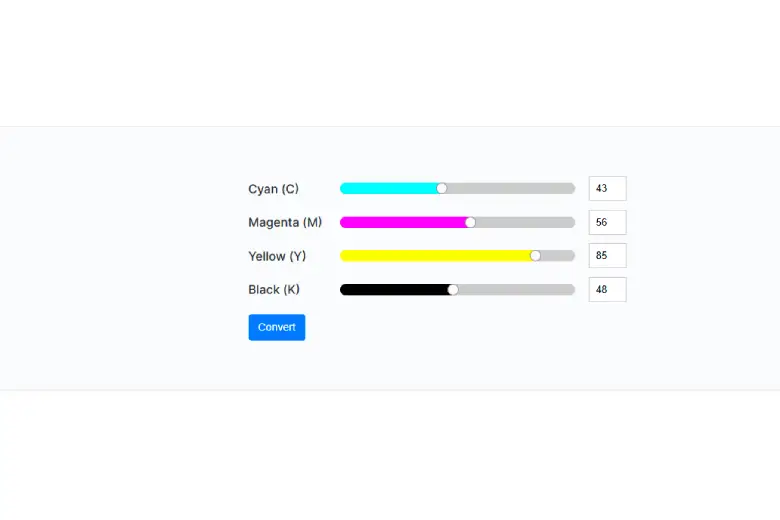
For demonstration purposes in this guide, we picked the CMYK to RGB converter that was ranking on the first page of Google. This is how its interface looks:
2. Input CMYK Values & Click the Button
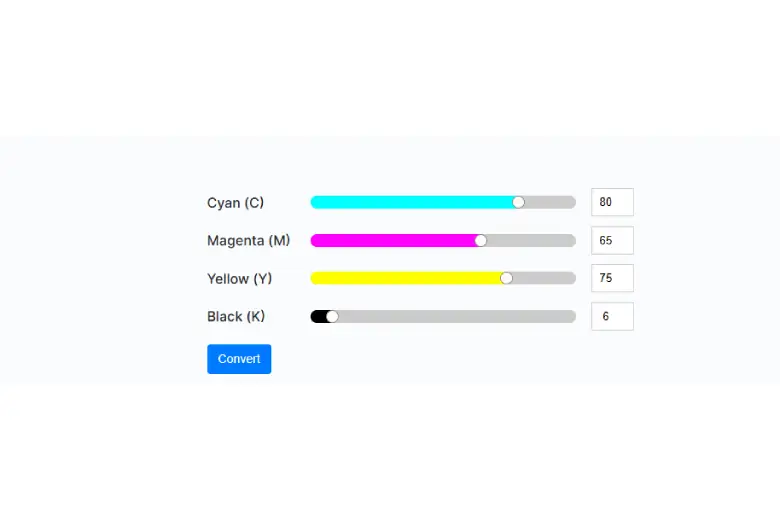
Once you’ve chosen the tool, all you need to do is carefully enter the values of the CMYK color of the original design. After entering, proceed to click the “Convert” button to start the color conversion.
We are going to enter the following CMYK values.
- Cyan: 80
- Magenta: 65
- Yellow: 75
- Key/Black: 6
A screenshot of the process below will help you visualize the step.
3. Note down or Copy the RGB Code
Once you click the button, the converter will immediately come up with the RGB color code. The results we got in our case can be seen in the image below.
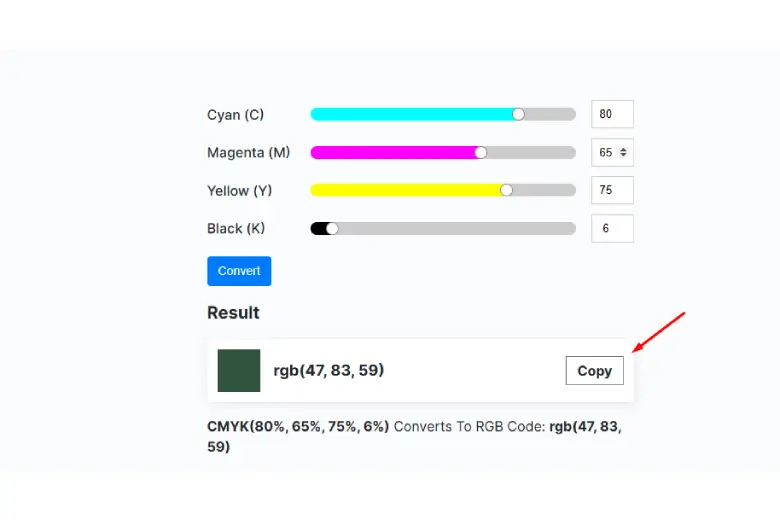
You can either manually note down the RGB combination or simply click the “Copy” button to get it in your device’s clipboard.
And, there you have it- the converted RGB color code you need.
Pro Tip: Be careful when entering the CMYK code; a single mistake can change output results.
Conclusion
The color scheme of your web design decides the audience's perception of your brand. Therefore, it is essential to choose the color system wisely. Two of the most popular options in the current era are RGB and CMYK.
We also recommend checking out this project by AND Learner, Dushyant Singh, to gain a deeper understanding of how colors work.
Frequently Asked Questions
1. Which color model should be used for web design?
RGB (Red, Green, & Blue) is the recommended color model. This is because digital screens make use of light to display colors, and RGB offers millions of vibrant colors that are highly suitable for displaying visuals online.
2. Is it possible to convert CMYK to RGB for web design usage?
Yes, it is possible with the help of a specialized CMYK to RGB converter tool. In our blog, you’ll find a step-by-step procedure of how this can be seamlessly done.
3. Are RGB colors consistent across different devices?
Mostly, but not always. This is because various devices may show the color slightly differently due to display technology, variations in color calibration, or specific screen brightness.
Next Steps
In case you need further assistance, here are some of our resources you can consider:
- Watch this session by design veteran and AND’s Academic Head, Prachi Mittal, and our Course Lead, Soumya Tiwari.
- Talk to a course advisor to discuss how you can transform your career with one of our courses.
- Pursue our Graphic Design courses - all courses are taught through live, interactive classes by industry experts, and some even offer a Job Guarantee.
- Take advantage of the scholarship and funding options that come with our courses to overcome any financial hurdle on the path of your career transformation.
Note: All information and/or data from external sources is believed to be accurate as of the date of publication.