





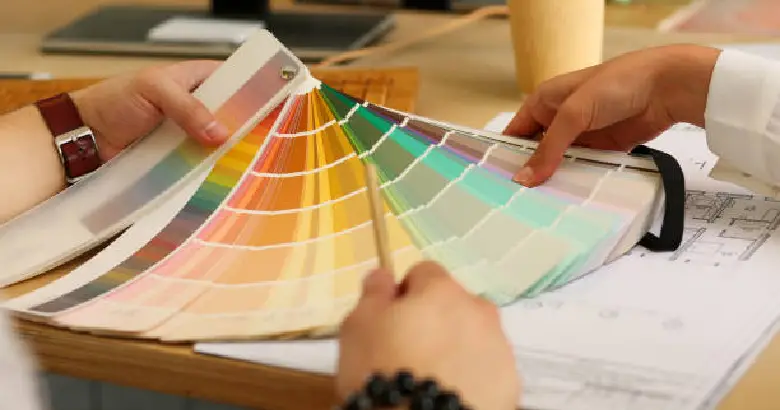
Scroll down to know about hex code colors, trace their origin, and understand how they differ from RGB colors. Explore their benefits and learn how to use them in your designs.
SUMMARISE WITH:


A hex color code is a systematic way of representing colors in a format that computers can read, understand, and display. It is typically used in website design, graphic design, and other related fields. With over 16 million possible color combinations, it offers designers a versatile tool for creating precise color choices.
Hex color codes allow designers to define exact colors for website elements, graphics, and user interfaces. Even free website builders rely on these codes. The precision these codes bring becomes fundamental to maintaining brand identity, creating visually desirable designs, and improving user experience. Learn everything that you need to know about hex color codes in this comprehensive guide and discover how to use them in your designs.
Here’s what we’ll cover!
- What is a hex color code?
- History of hex codes
- Free Hex Color Picker & Code Generator (Hex / RGB / HSL)
- What is the difference between hex codes and RGB?
- How do hex color codes work?
- Benefits of using hex color codes in graphic design
- How to read hex color codes?
- How to use hex colors effectively?
- 2026 Hex Color Trends Designers Are Using
- Hex Codes & WCAG Accessibility: Picking Colors That Anyone Can Read
- CSS Named Colors: Full Hex Chart
- 10 Hex Color Palettes for Common Design Briefs
- Things to keep in mind when working with hex codes
- Frequently Asked Questions
- Conclusion
What is a hex color code?
A hex color code is typically a six-digit code that combines numbers and letters and begins with a hash symbol (#), where each pair of digits represents the intensity of red, green, and blue. The term "hex" in hex code comes from "hexadecimal," a numbering system that uses 16 symbols: 0-9 and A-F.
Hex colors are derived from the RGB color model, which blends varying intensities of red, green, and blue to produce a wide range of colors. To create a hex code, the RGB (which stands for red, green, and blue) color values are converted into this number system. For example, the RGB color (224, 105, 16) becomes the hex code E06910.
Hex color codes offer a standardized method for representing colors across different platforms and devices. They use hexadecimal values to represent primary colors from the color wheel. Hex codes are universal and can be easily interpreted by designers and developers, ensuring consistent color representation in designs.
History of hex codes
The hex color code system originated during the early development of computer graphics. As computers transitioned from basic black-and-white screens to more advanced color displays, there was a growing need to standardize and define colors. The hexadecimal system, which was already used in computing for tasks like memory addressing, emerged as an effective solution. Its compactness and efficiency made it ideal for the purpose. The system was eventually adopted in HTML and CSS, making it a core element of web design and paving the way for the rich and color-filled user experiences we see today.
This shift to hex codes also allowed for greater consistency across various digital platforms, ensuring that colors appeared the same regardless of the device or software used. As a result, it allowed designers to lay the foundation for more dynamic and visually appealing websites.
Free Hex Color Picker & Code Generator (Hex / RGB / HSL)
There are various ways you can find a Hex Color Code. While you can manually calculate the codes, the most convenient way is to use a tool.

To easily generate and find Hex Codes, explore our interactive Hex color code finder. You can choose from a wide variety of colors available or use our color finder to pick your own. This tool will provide you with the option to copy the exact color code for your chosen color, along with the RGB and HSL codes.
Interactive Hex Color Code Generator:

What is the difference between hex codes and RGB?
The main difference between hex codes and RGB lies in their format. Hex color codes are always six digits long, making them predictable and consistent, which is why programmers often favor them. On the other hand, RGB values can range from three to nine digits, offering more flexibility but also requiring more attention to detail.
While hex codes are commonly used in web design, they are not mandatory. When coding in HTML, you can opt for RGB values or even color names instead. However, it’s important to note that just because you can use RGB values or names doesn’t mean you should. To avoid potential errors in your project, using a color hex wheel picker or converter is recommended to generate the desired hex code. This reduces the risk of future coders misinterpreting or manually converting the colors, ensuring your web page retains its intended look.
How do hex color codes work?
Hex colors are derived from the RGB color model, and a hexadecimal notation is used to indicate the blend of red, green, and blue (RGB) in a color. They are represented as #RRGGBB, where each RR, GG, and BB can contain 255 different values. This range specifies the intensity of each color.
The concept behind the model is that you can create almost any color by combining varying amounts of red, green, and blue color values. This model is used in digital screens as well as in devices like digital cameras and video projectors. With over 16.7 million possible combinations of these values, there is a wide range of colors to choose from. In fact, this number exceeds the human eye's ability to differentiate between each unique shade.
Structure of hex color codes
A hex color code follows a structure:
- The first two digits represent the red component
- The next two digits represent the green component
- The last two digits represent the blue component
For example, in the hex code #78C8FF:
- 78 indicates the red intensity
- C8 indicates the green intensity
- FF indicates the blue intensity
Conversion from RGB to Hex
RGB values, which range from 0 to 255 for each color, can be converted to hex by following these steps:
- Take the decimal value of the red, green, and blue components.
- Convert each value to its hexadecimal equivalent.
- Combine the hex values into a single hex code.
For example, to convert the RGB value (120, 200, 255) to a hex code:
- The red value 120 converts to 78
- The green value 200 converts to C8
- The blue value 255 converts to FF
So, the RGB value (120, 200, 255) is represented as the hex code #78C8FF.

Benefits of using hex color codes in graphic design
Before using hex color codes for your designs, it is important to understand their significance. Here are some compelling benefits:
1. Consistency
Hex colors provide a universal language of defining colors, making sure the exact same color appears on different devices, browsers, and operating systems. This consistency is essential for maintaining the integrity of designs across diverse platforms, whether it’s on a computer, smartphone, or tablet. By using hex codes, designers can be confident that the right color will be displayed consistently, regardless of where it's viewed.
2. Ease of use
Working with hex codes is simple because they consist of a hash symbol (#) followed by a combination of six letters and digits. This makes them compact and easy to write or copy-paste. Unlike other color systems, such as RGB, which requires multiple numbers (three values between 0 and 255), hex codes offer a more concise way to specify a color, which speeds up the design process.
3. Variety of colors
With millions of color combinations available, hex codes provide designers with a vast palette to work with. This allows them to materialise creative ideas and select the ideal shade or hue for their design projects.
4. Precision and accuracy
Hex codes allow designers to specify colors with a high degree of precision. Since each component of the color (red, green, and blue) is represented by two digits in the hex code, designers can achieve the exact shade or tone they want. This level of accuracy is significant for branding and when replicating specific color palettes across different media.
5. Wide compatibility
Nearly all digital platforms, from web browsers to design software, including graphic design tools, content management systems, and web development tools like HTML and CSS, support hex codes. This makes hex colors the go-to option for designers and developers, as they can be easily integrated into any project without worrying about compatibility issues.
6. Flexibility
Hex codes offer an enormous range of color possibilities. This flexibility allows designers to choose from an extensive palette of colors to match their creative vision, making it easy to find the perfect hue for any project. Whether working with vibrant tones or muted shades, hex codes provide versatility in designing with virtually any color imaginable.
7. No conversion needed
One of the major advantages of hex codes is that they don’t require conversion from one format to another. While RGB values (representing colors in terms of red, green, and blue intensity) sometimes need to be converted to hexadecimal or vice versa, hex codes are direct and ready to use. This simplifies the design process and eliminates the possibility of errors or inconsistencies caused by incorrect conversions.
How to read hex color codes

Image Courtesy: Techopedia.com
While hex codes may appear complex with their alphanumeric combinations, understanding them can help you become an expert in color precision and allow you to customize colors for your designs effectively. Here’s how they work:
1. Hexadecimal system
Hex color codes use the base-16 numbering system, which includes numbers (0-9) and letters (A-F). Each character represents four bits of information, known as a "nibble." For example, #FF5733 is a hex code for a shade of orange.
2. Structure of hex codes
A hex color code consists of six characters, typically grouped in pairs. These pairs represent the intensity of the three primary colors, red (R), green (G), and blue (B):
For example, in #FF5733:
- FF represents the highest intensity of red
- 57 stands for a moderate amount of green
- 33 indicates a small amount of blue
3. Understanding the scale
Since hex codes derive from the RGB model, understanding the intensity of each is critical to creating the right code.
- A code like #FF0000 represents full red (FF), no green (00), and no blue (00), creating a pure red color.
- A code like #00FF00 represents full green, no red, and no blue, resulting in a pure green color.
- A code like #0000FF represents full blue, with no red or green, giving a pure blue color.
How to use hex colors effectively?
Colors have the power to evoke a wide range of emotions and influence how viewers perceive a design. Before choosing hex colors for your project, it’s essential to consider the mood and message you want to communicate and select colors that align with those intentions.
The possibilities for colors are vast. Many resources are available to help you understand the meanings behind different colors. Be sure to consult experts in color psychology and conduct thorough research to make informed choices.
1. Experiment with color combinations
Test different hex color combinations to ensure they complement each other. Tools like color palette generators can help you identify appealing color schemes and create a list of colors that suit your design.
2. Pay attention to the contrast
Make sure there is enough contrast between the background color and text or other elements to ensure readability. The Web Content Accessibility Guidelines (WCAG 2.2) require a minimum contrast ratio of 4.5:1 for normal body text and 3:1 for large text. See the new WCAG section below for a worked example, or test your own combinations with the WebAIM Contrast Checker.
3. Optimize for the web
When using hex colors in web design, remember that some colors may look different across various screens and browsers. To maintain consistency, it's important to test the colors on different devices and browsers to ensure they produce the desired effect.
4. Use web-safe colors
Web-safe colors are limited to a palette of 216 colors, made up of six shades each of red, green, and blue. While the importance of web-safe colors has diminished with technological advancements and improved color management systems, the concept still provides a useful guideline for designers to select colors more likely to display consistently across various platforms.
2026 Hex Color Trends Designers Are Using
Color forecasting bodies such as Pantone, WGSN, Coloro - converge on a similar story for 2026: warmth, earth, and quiet confidence. The trending hex codes below appear repeatedly across brand refreshes, editorial design, and web design systems published in late 2025 and early 2026.
Trend Name |
Hex Code |
Why It's Trending |
Mocha Mousse |
#A47864 |
Pantone Color of the Year 2025; still dominating editorial and brand refreshes. |
Cloud Dancer |
#F0EEE9 |
Replacing pure white as the default neutral for web backgrounds. |
Olive Grove |
#6B7B3F |
Earthy green pulling brands away from saturated tech blues. |
Sandstone Beige |
#C9B79C |
Warm neutral pairing with darker accents. |
Cinnamon Stick |
#8C5A3C |
Replacing warm browns and burgundies for editorial accents. |
Soft Sage |
#BFC9B4 |
Quiet, accessible green for wellness and SaaS. |
Charcoal Plum |
#3D2C40 |
Replacing pure black for dark mode UIs. |
Ochre Yellow |
#CC8A2C |
High-contrast accent for editorial design. |
These codes are designed to work together — the warm neutrals (Mocha Mousse, Sandstone, Cinnamon) pair with the muted greens (Olive Grove, Soft Sage), and Charcoal Plum gives both groups a flexible dark anchor. Try the picker above to explore variants.
Hex Codes & WCAG Accessibility: Picking Colors That Anyone Can Read
Choosing a beautiful hex code is half the work. The other half is making sure people can actually read text in that color. The Web Content Accessibility Guidelines (WCAG 2.2) define minimum contrast ratios that every designer should treat as non-negotiable.
The thresholds that matter:
- WCAG AA - normal text: contrast ratio of at least 4.5:1 between text and background
- WCAG AA - large text (18pt+ or 14pt+ bold): at least 3:1
- WCAG AAA -- normal text: at least 7:1 (the gold standard for editorial and content sites)
- Non-text UI elements (buttons, form borders, icons): at least 3:1
Quick examples:
Foreground |
Background |
Ratio |
Verdict |
#000000 (black) |
#FFFFFF (white) |
21:1 |
Maximum possible — always passes |
#333333 (dark gray) |
#FFFFFF |
12.6:1 |
Passes AA + AAA |
#4A90E2 (brand blue) |
#FFFFFF |
3.5:1 |
Passes AA for large text only |
#CCCCCC (light gray) |
#FFFFFF |
1.6:1 |
Fails — avoid |
How to check your hex codes:
- Open the WebAIM Contrast Checker (webaim.org/resources/contrastchecker/).
- Paste the foreground and background hex codes.
- Read the AA / AAA pass/fail indicators for normal and large text.
For an internal team workflow, add a contrast check to your design system documentation — every color token should ship with a list of the backgrounds it can be used on. This single habit eliminates roughly 80% of accessibility regressions in product design.
CSS Named Colors: Full Hex Chart
The CSS specification defines a set of named colors you can use anywhere a hex code works. Names like "crimson" (#DC143C) or "cornflowerblue" (#6495ED) are easier to remember than hex codes and render identically across all modern browsers.
Below is a quick reference of the 24 most-used CSS named colors. For the full sortable, searchable, copy-on-click chart of all 141 named colors, use the interactive widget above.
Name |
Hex |
Name |
Hex |
Name |
Hex |
white |
#FFFFFF |
black |
#000000 |
red |
#FF0000 |
green |
#008000 |
blue |
#0000FF |
yellow |
#FFFF00 |
orange |
#FFA500 |
purple |
#800080 |
pink |
#FFC0CB |
brown |
#A52A2A |
gray |
#808080 |
silver |
#C0C0C0 |
gold |
#FFD700 |
navy |
#000080 |
teal |
#008080 |
coral |
#FF7F50 |
crimson |
#DC143C |
indigo |
#4B0082 |
khaki |
#F0E68C |
salmon |
#FA8072 |
tomato |
#FF6347 |
turquoise |
#40E0D0 |
violet |
#EE82EE |
cornflowerblue |
#6495ED |
All 141 CSS named colors are defined in the W3C CSS Color Module Level 4 specification and render consistently in every modern browser.
10 Hex Color Palettes for Common Design Briefs
Each palette below uses three to five hex codes balanced for contrast and harmony. Click any swatch in the picker at the top to copy a code, or use them as starting points and adjust to your brand voice.
Editorial - Warm Neutral: #FAF7F2 paper · #2B2A28 text · #B86A3D accent · #5C5751 secondary
Fintech - Trust + Modern: #0B1F3A primary · #2563EB interactive · #F8FAFC surface · #94A3B8 muted · #10B981 success
Wellness - Soft Sage: #F4F1EC base · #6F8A6E primary · #2D3B2D text · #D9C7A7 warm accent
Minimalist Portfolio: #FFFFFF surface · #111111 text · #FF3B30 accent · #6E6E6E secondary
SaaS - Dark Mode: #0E1117 surface · #21262D elevated · #C9D1D9 text · #58A6FF link · #3FB950 success
Editorial - High Contrast: #FFFFFF surface · #000000 text · #E63946 accent · #F1FAEE section bg
E-commerce - Beauty / Luxury: #FBF7F4 surface · #2A1F1A text · #B08D69 gold · #8B5E34 dark accent
Children's / Education: #FFE066 yellow · #2EC4B6 teal · #E71D36 red · #011627 dark text
Sustainability / Green Brand: #2D5016 forest · #87BC45 secondary · #F2EFE9 surface · #1A1A1A text
Editorial - Dark + Warm: #1F1B16 base · #F4E9D8 body · #C97B4B accent · #847468 muted
These palettes pass WCAG AA for body copy contrast where the background and text colors are paired as listed.
Things to keep in mind when working with hex codes
If you're accustomed to working with colors in Adobe Illustrator or for print, transitioning to hex colors for web design may require some adjustment. Here are a few things that can ensure your project runs smoothly:
1. Use hex color palette resources

Image Courtesy: Coda Community
When you want to create a unique design, selecting complementary colors from the 16 million hex options can feel overwhelming. Fortunately, other designers have made this easier by developing hex color palette databases and interactive selectors.
Color‑Hex Color Palettes - This platform allows you to explore thousands of community-created hex color combinations. You can browse through palettes by name, each with a descriptive title that gives you an idea of its style and includes all six hex colors. Clicking on a designer’s name reveals other palettes they've created. Color‑Hex Color Palettes is an excellent resource for finding color inspiration.
Coolors - Coolors combines inspiration with functionality to accelerate the design process. You can explore trending color palettes to see what other designers are using and save your favorites if you create an account. Another helpful feature is the palette generator, which lets you lock in specific colors and generate complementary ones by tapping the spacebar. This fast-paced tool makes creating new color combinations a breeze. Coolors is also available as an iOS app or Adobe extension.
2. Align hex colors with your design elements
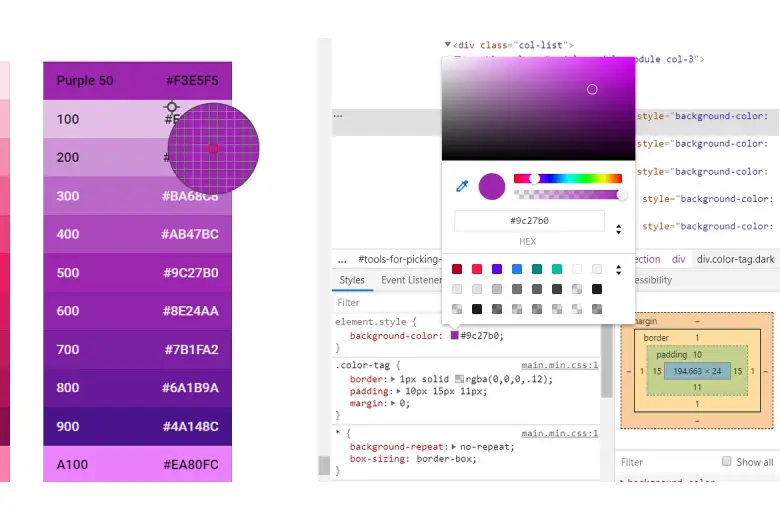
Image Courtesy: Stack Overflow
When designing for an existing website or trying to match other elements, it's essential to know the hex colors used on the site. A reliable color picker tool can be incredibly helpful, especially for creating attention-grabbing marketing materials.
ImageColorPicker allows you to upload any image and identify the hex colors it contains.
Another useful tool is the ColorPick Eyedropper, a Google Chrome extension that lets you easily find the hex color of any element on a webpage. If you spot a color you like on a site, simply use the Eyedropper to identify it.
If you're selecting imagery and other elements for the site, finding assets matching your chosen hex color palette works best. On iStock, you can filter search results by hex color. Enter the hex code or select a color using their picker, then add your search keywords. The site will return images that closely match the color you've chosen.
3. Be careful with color banding

Image Courtesy: SVGator
With 16 million possible colors, hex color codes offer a wide range of options for creating contrasts. However, since each pixel must display a unique color, hex codes don't allow smooth transitions between shades.
When web designers use hex colors to create gradients, the result can often be unexpected, leading to distinct color bands instead of a smooth blend. This phenomenon, known as color banding, is more likely to occur on older devices that can't display millions of colors.
In modern CSS, it's possible to program gradients in a way that minimizes color banding. On newer screens, color banding is most noticeable in natural gradients, such as skies or rainbows, where the many subtle color variations visible to the naked eye are compressed to save file space.
Conclusion
We hope you’ve found our holistic guide to hex color codes insightful and understood its importance for graphic designers. These codes are commonly used in web development and graphic design software, making them a fundamental tool for creating visually appealing and precise digital content. Their main advantage lies in their compact format, which makes them easy to use and understand in CSS and other design applications.
To learn more about hex color codes, a significant part of graphic design, check out the Graphic Design Course offered by AND. It has a comprehensive curriculum covering hands-on learning opportunities, unparalleled mentorship, and dedicated placement support. You can check out this project by AND Learner, Sanniddhi Goyal, to get an idea of all you can learn here!
If you’d like to know more about graphic design or related topics, head over to the AND Academy blog for more articles. As a starting point, you can consider going through the following resources:
1. RGB vs. CMYK – Which is the Better Color System for Web Designs?
2. What is RGB: A Complete Guide to the Color Model and Its Uses
3. What Is Product Packaging Design? A Holistic Guide With Tips and Examples for 2025
Frequently Asked Questions
1. What is a hex color code?
A hex color code is a six-digit combination of numbers and letters that represents a color in digital design. It starts with a hash (#) and follows the format #RRGGBB, where each pair defines the intensity of red, green, and blue.
2. How do hex color codes work?
Hex color codes work by combining red, green, and blue values in hexadecimal format. Each pair ranges from 00 to FF, indicating intensity from 0 to 255. The combination of these three values produces a specific color.
3. What is the difference between hex codes and RGB?
Hex codes and RGB represent the same colors but use different formats. RGB uses decimal values like rgb(255, 0, 0), while hex uses hexadecimal notation like #FF0000. Hex is more compact and commonly used in CSS.
4. What does #FFFFFF mean?
#FFFFFF represents white. It means red, green, and blue are all set to their maximum values, producing white light.
5. How do you read hex color codes?
To read a hex color code, remove the hash symbol and split the six characters into three pairs. Each pair corresponds to red, green, and blue values in hexadecimal format.
Next Steps
If you still have unanswered questions about pursuing graphic design, consider these additional resources for further information:
- Watch this session by graphic design industry leaders Soumya Tiwari and Sakshi Jain.
- Talk to a course advisor to discuss how you can transform your career with one of AND Academy’s courses.
- Explore our Graphic Design Course, which is taught through live, interactive classes by industry experts, and comes with a job guarantee.
- Take advantage of the scholarship and funding options that come with our courses to overcome any financial hurdle on the path of your career transformation.
Note: All information and/or data from external sources is believed to be accurate as of the date of publication.