




Want to know what UI UX design trends will be driving the strategy for success in 2026? Read this blog below to find out!
SUMMARISE WITH:


UI UX design trends are the way to go if you want to make a mark with your work in 2026! No matter who you are - a newbie, an expert, a teacher, or just an enthusiast, knowing what’s trending in UI UX is the key to understanding how digital screens will shift the way we perceive reality.
Knowing the latest trends in UI UX design is especially necessary for designers and businesses that want to stay relevant in the new year. So, without further ado, let us dive into the trends that will drive the world of user experience and user interface in 2026!
Here is a brief look at what we will be covering in this blog:
- Latest UI UX Design Trends 2026
- Generative User Interfaces & Hyper Personalization
- Anticipatory Design & Zero UI
- Spatial UX & 3D Environments
- Advanced Accessibility & Neuro-Inclusion
- Multi-Modal Interfaces
- Green Design & Sustainable UX
- Ethical Design & Transparency
- Emotional & Empathetic Design
- How to Incorporate Latest UI UX Trends in Your Design?
- Conclusion & Next Steps
Ready to dive into the latest trends in the world of UI UX design? Let’s dive in!

Latest UI UX Design Trends 2026
Here are the top UI UX design trends that will define the way designers design and users perceive in the coming year!
1. Generative User Interfaces & Hyper Personalization
In 2026, Generative UI (GenUI) is set to change the way people experience your website or app design. This technology uses Artificial Intelligence (AI) to rebuild the interface in real-time based on exactly what the user is trying to do at that moment. It focuses on intent rather than a fixed path, making the software feel custom-built for every individual user. Here are some key aspects of this UI design trend:
- Adaptive Layouts - If a user is a beginner, the UI might show only the basic tools. If the user is an expert, the AI will automatically reveal complex features and data.
- Content Summarization - The UI can automatically condense long articles or data sheets into a simple dashboard if it senses the user is in a hurry.
- Personalized Themes - The app may change its color palette or font size based on the user's visual preferences.
2. Anticipatory Design & Zero UI
The most important UI UX design trend in 2026 will be Anticipatory Design as a UX strategy. It uses data to predict what a user wants before they even ask for it. The goal is to reach a state of Zero UI, where the user doesn't have to navigate a menu at all because the system has already performed the task. This reduces the cognitive load and makes technology feel more helpful and intuitive. The key features of this trend are:
- Automated Tasks - If you have a meeting on your calendar, your navigation app will already have the directions ready the moment you get in your car.
- Smart Defaults - Forms and checkout pages are almost entirely pre-filled based on past behavior and secure data sharing.
- Proactive Alerts - Instead of just sending a notification that a bill is due, the app might ask, “Would you like me to pay your pending bill using your default card?"
3. Spatial UX & 3D Environments
The era of flat, 2D designs is over. With the widespread use of mixed-reality headsets and augmented reality tools, digital elements are now becoming 3D, seeking to give an out-of-screen experience. Known as Spatial UI UX, it will be one of the biggest UI design trends in 2026. It requires designers to think about depth, lighting, and physical space rather than just pixels on a flat surface. Here are the key aspects defining this UI UX design trend:
- Z-Axis Hierarchy - Instead of making a font bigger and more noticeable, you might move that text "closer" to the user in a 3D space.
- Object Persistence - If a user places a digital asset made via software on their kitchen wall, it needs to remain there even if they turn the device off and come back later.
- Natural Gestures - We are moving away from clicking. Users should be able to navigate using eye movements, hand pinches, and simple voice commands.
4. Advanced Accessibility & Neuro-Inclusion
Accessibility is no longer just about adding an "alt text" to images or enabling voice commands. In 2026, the focus has shifted toward advanced accessibility and neuro-inclusion. This means designing for people with different types of brain processing, such as ADHD, autism, or dyslexia. An inclusive design makes the experience better for everyone, as it prioritizes clarity, focus, and ease of use. It ensures that your product is usable by the widest possible audience. Here are its defining factors:
- Focus Modes - Allowing users to hide distracting navigation bars, ads, and animations so they can focus on the core content.
- Customizable Readability - Letting users switch to fonts designed for dyslexia or change the spacing between lines for better focus.
- Flexible Inputs - Ensuring every action can be completed via voice, keyboard, or simple gestures for better accessibility.
5. Multi-Modal Interfaces
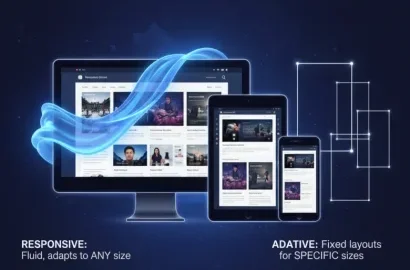
Nowadays, user journeys rarely stay on one device. A person might start looking for a product on their laptop, read reviews on their mobile during transit, and complete the purchase on their tablet. "Liquid UX" ensures that the transition between these devices is seamless. The interface "flows" from one screen to another, remembering exactly where the user left off and adapting the screen to fit the current device. Here are the key features of this UI UX trend:
- Continuity - If you are halfway through filling out a form on your phone, you should be able to open your device and see the cursor exactly where you left it.
- Voice-to-Touch Handhelds - You tell your smart speaker to "add this to my cart," and it gets reflected on your mobile app instantly.
- Contextual Awareness - The app understands which device you are using and changes its interface to match the same.

6. Green Design & Sustainable UX
The reality of digital products having a physical impact on the planet is becoming more apparent day by day. In 2026, Green Design is a major priority. Sustainable UX is about creating interfaces that require less processing power, less data, and less battery life. This is good for the environment and makes websites incredibly fast, which is also a key factor in how search engines rank your content. The key features include:
- Dark Mode Defaults - Using darker colors helps save battery life on modern OLED screens.
- Image Optimization - Moving away from heavy photos and toward lightweight vector illustrations that load faster.
- Clean Code - Writing efficient code that loads faster and reduces the load on a phone's processor, keeping the device cool and saving energy.
Also Read: Is Coding Essential for UI UX Designers?
7. Ethical Design & Transparency
With concerns regarding privacy becoming prevalent, trust is becoming a crucial currency in the digital world. In 2026, users demand honesty and transparency. Ethical design is about being completely transparent about data, privacy, and how algorithms work. When a user feels respected and in control, they are much more likely to stay loyal to a brand. Here are the key aspects that define this emerging UI UX design trend of 2026:
- Clear Data Usage - Using simple, visual summaries to explain what data is being tracked, rather than hiding it in long legal documents.
- Easy "Opt-Out" - Making it as easy to cancel a subscription as it was to sign up for one.
- Explainable AI - Providing clear, brief explanations for why an AI system made a specific recommendation or decision.
8. Emotional & Empathetic Design
Interfaces are becoming more attuned to human emotions. By utilizing biometric feedback and behavioral patterns, Emotional AI can detect user frustration, confusion, or satisfaction. In 2026, UX design will respond to these emotions to create a more supportive experience. If a user is struggling with a complex form, the interface might simplify itself or offer a suggestion that lowers the user's stress level. Here is what this UI UX design trend entails:
- Tone Adjustment - A chatbot might change its language from professional to sympathetic if it detects the user is having a difficult time.
- Friction Reduction - Identifying when a user clicks a button repeatedly out of frustration or hovers over it in anxiety, and offering a way to fix the error.
- Biometric Feedback - Designing notification systems that respect the user’s focus and stress levels, only interrupting when absolutely necessary.

How to Incorporate Latest UI UX Trends in Your Design
If you want to create designs that truly deliver the best possible user experience, then you need to apply these UI UX design trends to your upcoming projects! Wondering how? Check out below!
- Prioritize Speed and Efficiency - Most UI UX design 2026 trends, like Sustainable UX and Anticipatory Design, focus on making things faster. Start by removing unnecessary steps in your user journey, and you have a winning strategy at hand.
- Build for Flexibility - In 2026, start building a library of flexible components that can work on a watch, a phone, or in a 3D space. This UI UX trend is the one that will make your design system ready for whatever new device comes out next.
- Focus on Data - Use analytics to tap into empathy while designing. Find where users are getting frustrated or anxious. If you see people dropping off at a certain point, consider using an empathetic approach to simplify that step.
- Build for Trust - Take a hard look at your current design, and if there are any sneaky elements, then cut them off. 2026 UI UX trends are about trust combined with clear, honest communication. Treat transparency as a key feature, not an optional choice.
Conclusion & Next Steps
UI UX Design trends are the key to your design success in 2026! Knowing and leveraging these trends will help your design become more advanced and user-friendly. It is important to understand that UI design trends are no longer just about creating an interface but rather an experience that makes your users’ lives easier.
We hope this blog offered value that will help drive your 2026 UI UX design strategy! You can check out this project by AND Learner, Yash Ramdas, to get further inspiration for your next project.
In case you think you need further assistance, here are some of our resources you can consider:
- Watch this session by Shiva Viswanathan, Design Head of Ogilvy Pennywise, and Naman Singh, Product Experience Designer at RED.
- Talk to a course advisor to discuss how you can transform your career with one of our courses.
- Pursue our UI UX Design courses - all courses are taught through live, interactive classes by industry experts, and some even offer a Job Guarantee.
- Take advantage of our scholarship and funding options to overcome any financial hurdle on the path to your career transformation.
Note: All information and/or data from external sources is believed to be accurate as of the date of publication.