





Want to know what visual hierarchy is and how it impacts your design? Read this comprehensive guide to learn all about its meaning, principles, and applications in UI UX design
SUMMARISE WITH:


The contemporary digital environment overwhelms users with information, making the modern digital experience a race for attention. And, the ultimate determinant of success is not how much information you present, but how effectively you guide the user through it. The human brain is designed to naturally resist ambiguity and seek patterns and shortcuts, which means designers must structure content not just to be visible, but to be effortlessly consumed.
This necessity gives rise to visual hierarchy, which is the arrangement of elements to imply their order of importance and is fundamental to creating usable and aesthetically pleasing digital experiences. Understanding the core meaning of visual hierarchy is essential, as it dictates the entire user flow. On that note, we present this guide. It will serve as a definitive resource, covering the precise definition and principles of visual hierarchy, illustrating its practical application through key examples, and demonstrating why mastering visual hierarchy UX is the single most critical factor in developing a successful product.

Image Courtesy: Shutterstock
The Foundation: What is Visual Hierarchy?
The question can be answered concisely: it is the arrangement and presentation of visual elements to imply their order of importance. It is the designer’s job to dictate the flow, ensuring the user immediately comprehends the main goal of the interface. This order is crucial because it directly impacts the overall User Experience (UX). The objective is singular: to organize every element in a specific order of importance, ensuring the user grasps the most critical information first.
This matters profoundly in UI UX Design because when a hierarchy is unclear, the user experiences cognitive overload- meaning they have to exert a larger amount of mental energy to figure out what to look at and what to do next. Effective visual hierarchy in UX minimizes this friction, making the interface feel intuitive. By clearly prioritizing elements, the design directs the user toward desired actions (like a 'Buy Now' button), directly enhancing both usability and conversion rates.
The Core Principles of Visual Hierarchy
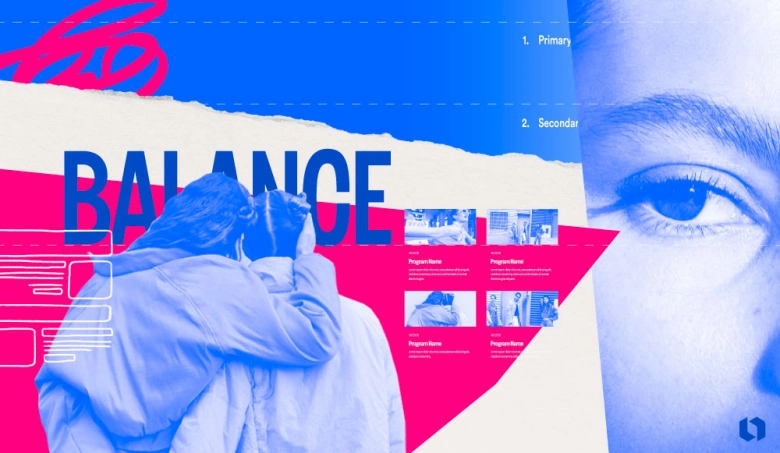
Image Courtesy: Looka
With the definition now clear, let’s dive deep into the fundamental principles of visual hierarchy. These principles are the tools designers use to manipulate visual weight, guiding the user's attention across the interface.
1. Size and Scale: The Dominance Effect

Image Courtesy: Zeven Design
The most intuitive of all principles is Size and Scale. Larger elements naturally dominate the frame, attracting the eye before smaller ones. This simple principle establishes the primary order of importance. A website’s primary headline must be the largest element of text, instantly establishing the page's core subject. Using progressively smaller sizes for sub-headings and body copy establishes a structural hierarchy that the user can comprehend at a glance.
2. Color and Contrast: Drawing the Eye
Color and Contrast are powerful tools for establishing hierarchy, especially for interactive elements. High-contrast pairings (e.g., black text on a light background) ensure readability, while a single, highly saturated color can be reserved exclusively for the most critical elements, like a Call-to-Action (CTA) button. By carefully controlling the contrast, you can direct the user's eye away from secondary information and straight to the conversion point.
3. Space and Proximity (Whitespace): The Grouping Principle
Whitespace, often called negative space, is the empty area around and between elements. This space is a critical design tool. The Principle of Proximity suggests that elements placed close together are perceived as being related. Conversely, placing significant whitespace around a key block of text or an image isolates it. This isolation increases its perceived importance and makes it the focal point, aiding clarity and focus by minimizing clutter.
4. Typography: Weight, Style, and Structure
Typography is the backbone of text-based hierarchy. Beyond size, designers use font weight (e.g., 'Bold' for emphasis) and case (e.g., UPPERCASE) to signal importance. Establishing a clear Typographic Scale—a pre-defined, proportional set of text sizes and weights—ensures consistency and instantly communicates whether a block of text is a title, a sub-heading, body copy, or a mere caption.
5. Texture, Depth, and Shadow (Z-axis)
In modern interfaces, the Z-axis refers to the perceived depth of an element. Techniques like drop shadows and elevation (as championed by Google’s Material Design) create the illusion that some elements are closer to the user than others. An element that appears "lifted" (like a dialog box or a Floating Action Button) automatically gains a higher visual priority and instantly signals that it is an important, often interactive, element.
Visual Hierarchy Examples in Action
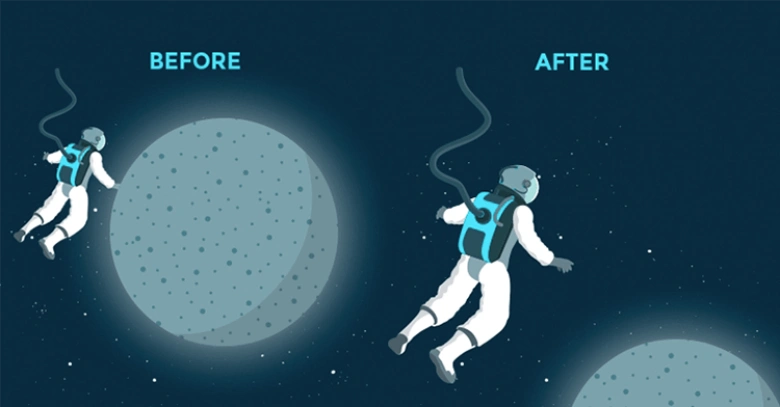
Image Courtesy: JustinMind
In this section, we’ll focus on practical application, showing how designers use the core principles—size, contrast, and proximity—in real-world scenarios. These are classic visual hierarchy examples that dictate successful user interaction and conversion.
1. The F-Pattern and Z-Pattern: Natural Reading Flows
Users rarely read web pages; instead, they scan them. Effective visual hierarchy ensures the content aligns with the brain's natural tendency to scan in specific patterns.
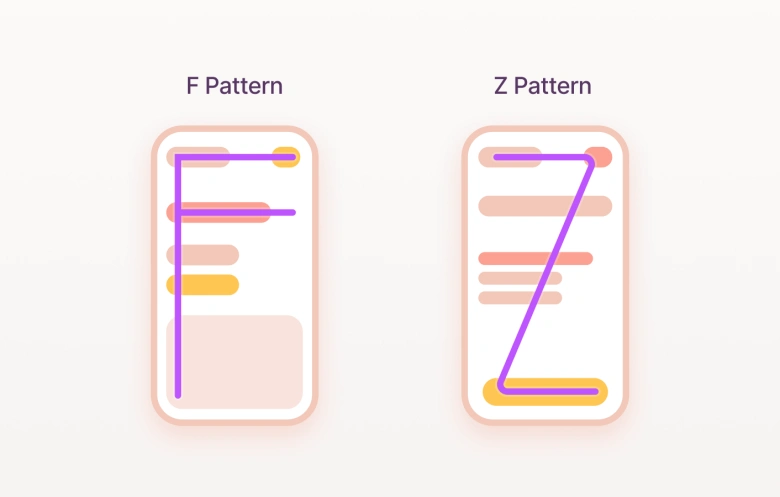
Image Courtesy: RareLoop
The F-Pattern: Typical for text-heavy pages (like articles or search results). The eye moves across the top, then drops down the left side, searching for keywords or subheadings, forming the letter 'F'. Designing for this means placing the most critical summaries along the top and left margins.
The Z-Pattern: Ideal for minimalist landing pages. The user scans from top-left (the starting point, often the logo), across to the top-right (secondary action), then diagonally to the bottom-left (value proposition), and finally across to the bottom-right (the primary CTA). Following this "Z" path ensures the user receives the brand message and is immediately guided to the desired action.
2. E-commerce Product Page Hierarchy
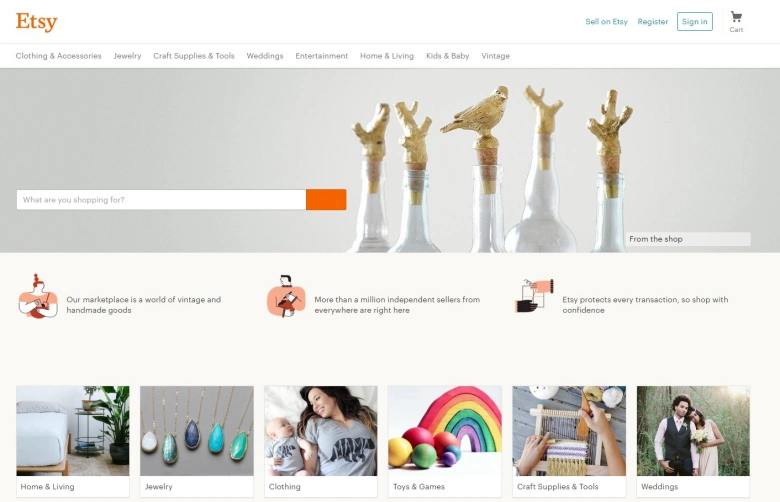
On an e-commerce product page, every element is carefully designed to drive a sale. The hierarchy of attention is controlled through size, position, and color contrast. The product image or video occupies the largest area and the prime left-side position, capturing the user’s attention immediately. The price is displayed in a bold, large font, leveraging the principles of size and scale to ensure it is highly visible. The ‘Add to Cart’ button serves as the critical conversion point; it uses the highest color contrast on the page, often in a bright accent color, and is prominently sized and positioned so that it stands out as the single clearest action. Reviews and product details are positioned below the primary purchase elements, providing reassurance to the user without distracting from the main call-to-action.
Every visual cue on the page guides the user’s eye along a deliberate path, from attention, to value, to action—maximizing the likelihood of a purchase.
3. Mobile App Navigation
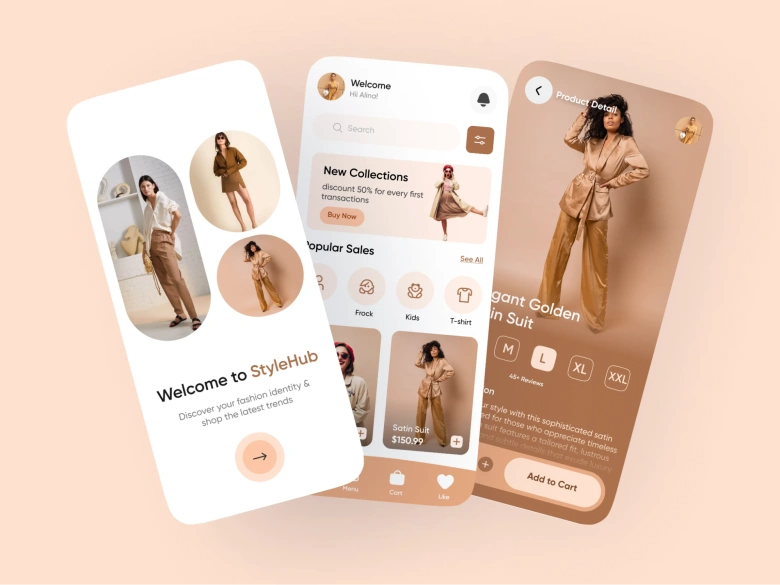
Image Courtesy: Dribble
Designing for mobile is one of the toughest challenges for visual hierarchy in UX because screen space is limited. To make navigation intuitive, critical elements are prioritized, using position and depth. Bottom tab bars take advantage of position by placing primary navigation icons within the user’s natural thumb-reach area, ensuring easy accessibility.
Floating Action Buttons (FABs) combine several principles: they are large, use the app’s accent color for strong contrast, and appear to float above the content with shadows, creating a sense of depth. These buttons are reserved for the most important action on a screen, such as creating a new post or composing a message.
4. Blog Post/Article Hierarchy
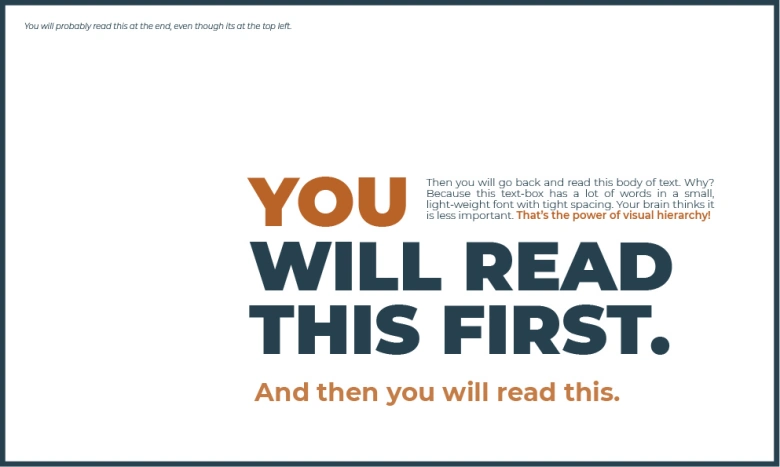
In long-form content, the hierarchy is designed to enhance scannability. This is achieved through a consistent typographic scale, where clear headings of varying sizes differentiate major sections from sub-sections, breaking the content into digestible chunks. Strategic bolding within the body text adds a third level of hierarchy, allowing readers to quickly identify key concepts and takeaways. Such a structure is essential for reducing the effort required to process large amounts of information, making the content easier to navigate and understand, as well as aiding readability.
Gestalt Principles: The Psychology of Visual Hierarchy
To truly master visual hierarchy in UX Design, one must understand the psychology behind it. The Gestalt Principles are a set of rules describing how the human brain perceives and organizes visual elements, seeing them as a complete, structured whole rather than disconnected parts. Applying these principles ensures your intended hierarchy aligns with the user's natural psychological tendencies.
1. The Principle of Proximity (Revisited)

Image Courtesy: Prezentium
The Principle of Proximity states that items located near one another are psychologically linked and perceived as belonging to the same group. In form design, this is critical: by placing a smaller amount of space between related fields (like "First Name" and "Last Name") and a larger amount of space between unrelated blocks of fields (like separating "Name" from "Address"), the designer uses space alone to simplify complex information and reduce the perceived number of elements.
2. The Principle of Similarity
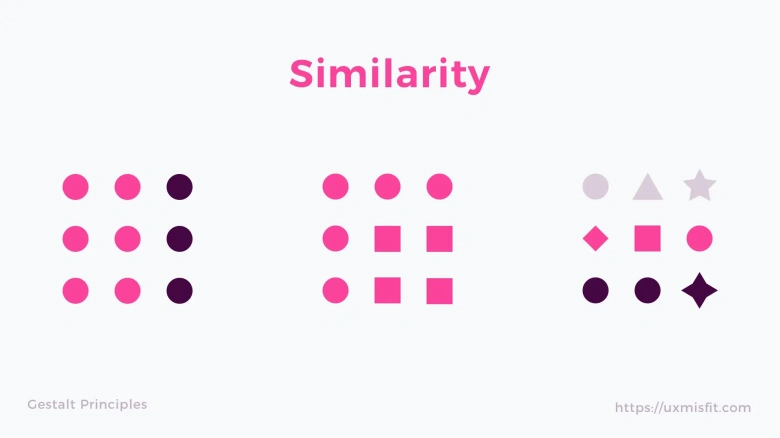
Image Courtesy: UserPeek
The Principle of Similarity suggests that if elements share visual attributes—like color, size, shape, or typography—users will intuitively understand that they perform the same function or have the same level of importance. This is vital for consistency in UI. For example, reserving a specific color and shape for all primary buttons throughout an interface ensures that users recognize any element with those characteristics as an important, actionable item, thus reinforcing the hierarchy.
3. The Principle of Closure
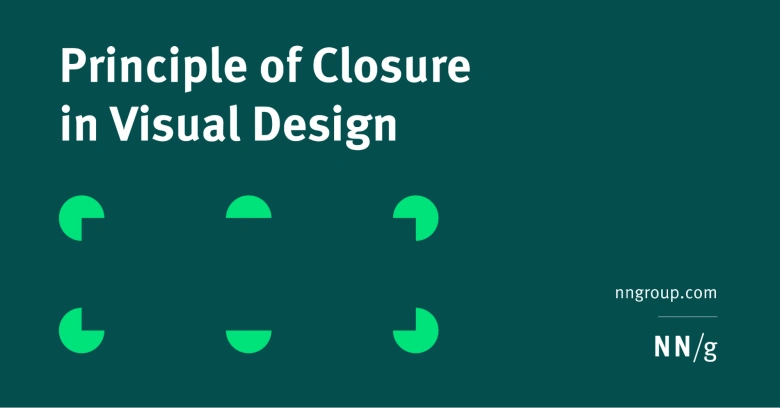
Image Courtesy: UserPeek
The Principle of Closure describes the human tendency to perceive a set of disconnected elements or an incomplete shape as complete. Designers use this in minimalist design to declutter the UI. Instead of using solid lines to border every container or card, subtle shadows, corners, or negative space are often used to imply the boundary. The user's mind fills in the rest, creating a clean, structured appearance while maintaining the visual separation necessary for hierarchy.
In simple words, people tend to fill in blanks to perceive a complete object whenever an external stimulus partially matches that object.
4. The Principle of Common Region (or Enclosure)
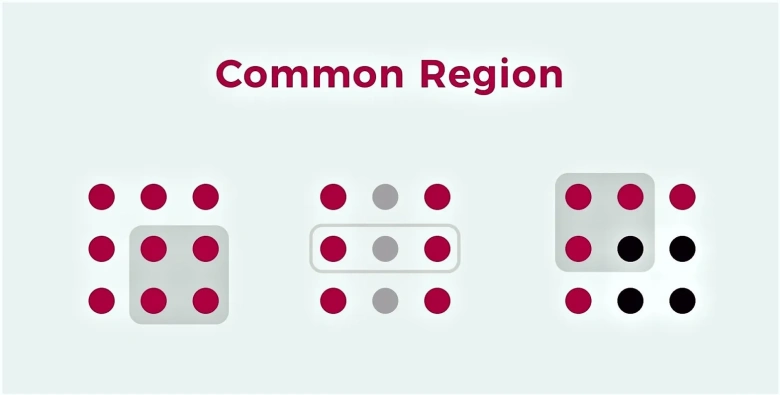
Image Courtesy: Neilson Norman Group
The Principle of Common Region (or Enclosure) is a powerful grouping method where an explicit boundary, such as a box, frame, or distinct background color, forces elements within it to be perceived as a single unit, even if the elements inside are physically spaced apart. This is indispensable for organizing complex layouts. For instance, on a dashboard, each self-contained widget or panel is defined by this boundary, clearly separating it from adjacent information and establishing a hierarchy of content blocks.
Testing and Iterating Your Visual Hierarchy
The final stage of mastering visual hierarchy is validating your design choices. Intuition is a start, but a truly successful hierarchy must be validated with data. This step ensures that your visual arrangement is effectively guiding the user’s eye and helps meet business goals.
1. Low-Fidelity Testing: The Squint Test
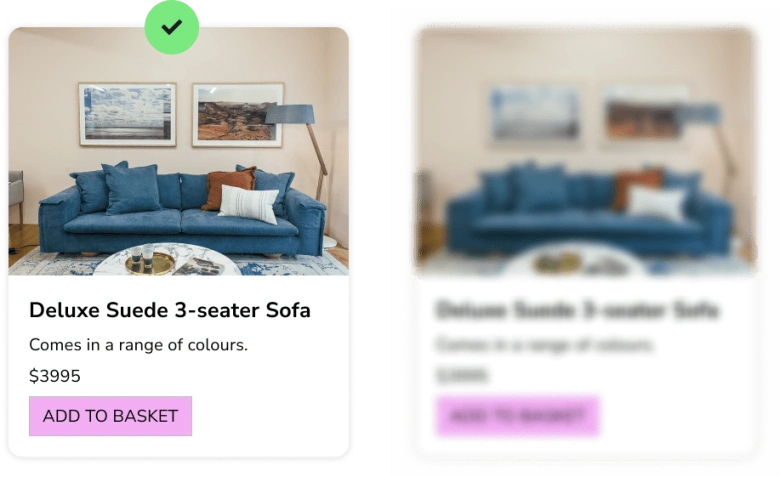
Image Courtesy: AI Power
The Squint Test is the simplest and fastest way to evaluate a design's hierarchy. By blurring your vision or squinting slightly, you intentionally strip away detail and focus only on the elements that dominate the screen. If the elements intended to be at the top of the visual hierarchy (e.g., the primary CTA button or the main headline) disappear or blend with less important content when blurred, the hierarchy needs immediate work. The elements of highest importance must remain the clearest, validating your use of size, color, and contrast.
2. Quantitative Testing Methods
For definitive proof of performance, designers use quantitative methods:

Image Courtesy: Alpha.One
- A/B Testing: This is the gold standard for validating a hierarchy choice. It involves showing two versions of a page (e.g., Version A has a red CTA button; Version B has a blue one) to different users to see which one performs better in terms of clicks or conversions. A/B testing scientifically confirms which implementation of visual hierarchy best serves the purpose.
- Eye-Tracking/Heatmaps: These tools provide concrete data on user behavior. Heatmaps visually indicate where users spend the most time looking (focus heatmaps) and where they click (click heatmaps). This data shows whether your intended hierarchy matches the user’s actual focus. If users are looking everywhere except the primary CTA, the hierarchy requires iteration.

To sum it up
The best digital experiences feel effortless because the designer has successfully applied visual hierarchy to control the user's focus with intent. By applying the core principles of Size, Color, Proximity, and Typography, and by grounding those choices in the psychological certainty of Gestalt Principles, designers transcend mere aesthetics. The result is a design that is attractive, profoundly usable, and goal-driven.
Mastering the principles of visual hierarchy is the step that separates a good designer from a great one. It is the crucial skill that allows you to truly dictate the user journey. It also ensures that every user sees the most important information first, understands the path forward, and is directed toward the ultimate product goal. We hope this guide helped you understand this crucial aspect of delivering stellar user experiences.
Next Steps
You can check out this project by AND Learner, Vinay Bandi, to learn more about how to create comprehensive UI UX designs.
In case you think you need further assistance, here are some of our resources you can consider:
- Watch this session by Shiva Viswanathan, Design Head of Ogilvy Pennywise, and Naman Singh, Product Experience Designer at RED.
- Talk to a course advisor to discuss how you can transform your career with one of our courses.
- Pursue our UI UX Design courses - all courses are taught through live, interactive classes by industry experts, and some even offer a Job Guarantee.
- Take advantage of our scholarship and funding options to overcome any financial hurdle on the path to your career transformation.
Note: All information and/or data from external sources is believed to be accurate as of the date of publication.