





When ChatGPT went mainstream, it marked a real turning point in how we think about AI, which is shifting the conversation away from replacement and toward collaboration. The question isn’t whether AI will replace us anymore, but how it’s already changing the way we work.
SUMMARISE WITH:


When ChatGPT went mainstream, it marked a real turning point in how we think about AI, which is shifting the conversation away from replacement and toward collaboration. The question isn’t whether AI will replace us anymore, but how it’s already changing the way we work.
A while ago, the industry was gripped by a single, existential question and by 2026, that fear has largely been replaced by a more practical reality: Augmented Design. The truth is that AI is unlikely to replace you if you understand how to employ it as a force multiplier for your own expertise.
Addressing the Myth: "AI will design the entire app for you"
The Reality? Not quite. ChatGPT has effectively become the "Junior Designer" that never sleeps. It is exceptional at handling the high-volume "grunt work", data synthesis, edge-case documentation, and competitive benchmarking. This allows you to reclaim your time for high-level strategy and human-centric problem solving for which the human brain is actually designed.
In 2026, we will enter the era of multimodal capabilities and agentic workflows. This means your AI design partner is capable of analyzing screenshots to find heuristic violations and act as an autonomous agent to map out complex logic flows.
The secret to thriving in the era of AI is simple: be human. Tools like ChatGPT now handle the heavy lifting like research, iteration, and even first drafts, which fundamentally changes how UX design work gets done since now there’s bandwidth to be creative. What matters now is your ability to apply judgment, shape direction, and bring empathy to decisions that no model can fully ever understand or replicate.
- Old UX (The Manual Era) vs. 2026 UX (The AI Era)
- Ways to Use ChatGPT for UX Design in 2026
- Designing UX with Integrity with ChatGPT
- To Sum Up
Old UX (The Manual Era) vs. 2026 UX (The AI Era)
Workflow Phase |
Old UX (Manual) |
2026 UX (AI-Augmented) |
Discovery |
40 hours of review reading. |
40 seconds of AI synthesis. |
Ideation |
Staring at a blank Figma page. |
Starting with 5 AI-generated logic trees. |
Writing |
"Lorem Ipsum" everywhere. |
Brand-tuned microcopy from Day 1. |
Auditing |
Manual checklists and gut feeling. |
Vision-API scans for WCAG & Heuristics. |
Handoff |
Static PDFs and manual specs. |
Live JSON tokens and AI-written PRDs. |
Now that you know the advantages of ChatGPT in UX Design, let’s dive into how!

Ways to Use ChatGPT for UX Design in 2026
1. Instant Competitor Benchmarking
The Pain Point: Traditionally, competitive audits were one of the most tedious and resource-heavy phases of UX research. A researcher would spend dozens of hours manually scraping App Store reviews, Reddit threads, and G2 reports. By the time the audit was finished, the market had often already shifted, and the sentiments had undergone a shift.
The AI Playbook: In 2026, we treat ChatGPT as a High-Speed Qualitative Processor. By feeding the model raw datasets, you can perform Sentiment Mapping in seconds. The AI identifies "Latent Needs" - the specific frustrations users have that they aren't explicitly naming. By feeding the AI thousands of data points, you can generate a "Gap Analysis" that highlights exactly where competitors are failing their users emotionally.
Implementation: Export 500 user feedback entries as a CSV (for example, product reviews or survey responses). Ask ChatGPT to identify “hidden discontent” issues users mention in passing that point to deeper structural flaws in the competitor’s UX.
The 2026 Prompt: "Act as a Lead UX Researcher. Analyze these 500 user reviews for [Competitor]. Identify the top 5 recurring friction themes and categorize them by severity. For each theme, suggest a 'How Might We' statement that would allow our team to solve this problem better than the current market leader."
2. Generating "Data-Backed" User Personas
The Pain Point: User personas were the “fictional fluff” of design decks. “Persona Pete” was often based on a stock photo and a few demographic guesses, leading to products that lacked real-world resonance and turning personas into decorative slides that looked polished in presentations but offered little real guidance when it came to actual design decisions like wireframing or feature prioritization. These demographics-heavy profiles (age, location, hobbies, etc.) rarely helped designers make difficult decisions during the wireframing phase.
The 2026 workflow: The static personas have now moved to Behavioral Archetyping, by synthesizing real interview transcripts and user session logs. Instead of focusing on demographics (age, location), the AI focuses on Mental Models and Jobs-to-be-Done (JTBD). It identifies the "Anxiety Points" and "Switching Triggers," the exact moments when a user decides their current tool is no longer enough.
- Case Study: A fintech startup used AI to analyze 50 transcripts. The AI discovered that users weren't "confused by numbers" (the demographic assumption); they were "anxious about hidden fees" (the behavioral truth).
- The 2026 Prompt:
"Analyze these 10 raw interview transcripts. Do not create generic personas. Instead, identify three 'Behavioral Archetypes' based strictly on their Internal Narratives. For each, define their 'Current Workaround' (how they solve the problem now) and their 'Breaking Point' (what makes them finally switch to a new tool)."

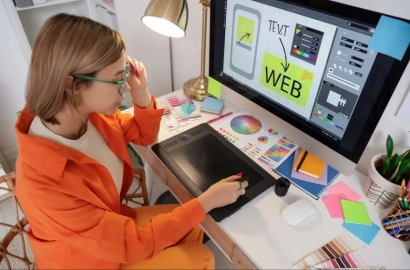
Image courtesy: LinkedIn
3. Simplifying Information Architecture
Mapping out a complex Information Architecture (IA) like a multi-vendor marketplace or a medical dashboard can quickly become overwhelming. Designers often miss logic loops or edge cases, such as what happens when a user’s session expires mid-checkout.
The 2026 workflow: Use Generative Logic Trees. By describing the "Business Logic" to ChatGPT, it generates a complete sitemap in Mermaid.js code - a lightweight text-based syntax used to create flowcharts and diagrams. This code is then pasted into Figma, GitHub, or Notion to instantly visualize the entire journey of a user. This logic-first approach ensures the product structure (skeletal integrity) is sound before a single UI element is designed.
- Implementation: Use the AI to "Stress Test" your flow. Ask it to identify "Dead Ends" where a user might be stranded without a clear next step.
- The 2026 Prompt:
"I am designing a 'Pro-Tier' upgrade flow for a SaaS platform. The flow must include: Plan Selection, Payment, Multi-Factor Auth, and a Success State. Map out 5 'Unhappy Paths': 1. Payment Declined, 2. Email not verified, 3. User cancels halfway, 4. Account already upgraded, 5. Timeout during processing. Output this as a Mermaid.js flowchart."
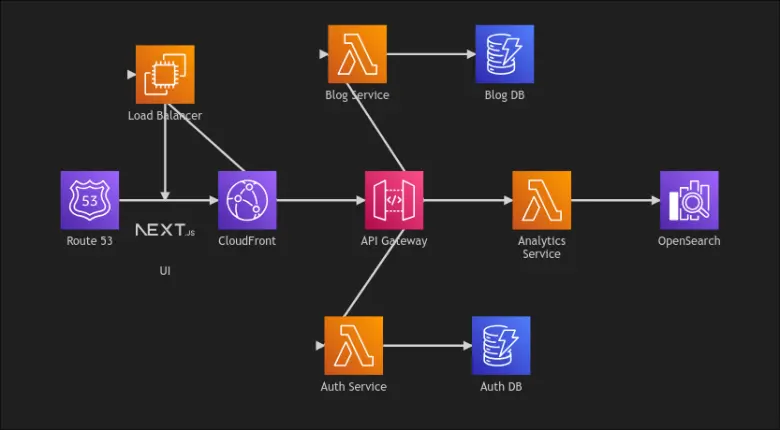
Image courtesy: Medium
4. Writing Effective UX Microcopy
"Lorem Ipsum" kills design and hides hierarchy issues and makes prototypes feel fake. However, most designers are not professional copywriters, often leading to robotic system messages like "Error 404: File Not Found."
In 2026, Contextual Copywriting is a standard integration. Use ChatGPT to "tune" our interface language to a specific brand voice document. The AI ensures that every tooltip, empty state, and error message feels like it was written by the same person, and remains consistent with the brand’s personality, allowing trust even in moments of high user friction.
- Expert Tip: Use the AI to generate multiple variants of a CTA (Call to Action) based on the user's intent level (e.g., "Exploring" vs. "Ready to Buy").
- The 2026 Prompt:
"Our brand voice is 'Expert, yet Playful.' We never use 'Corporate-speak.' Rewrite the following 3 UI messages: 1. 'Your password is too short.' 2. 'We couldn't find any results for your search.' 3. 'Your subscription has been successfully updated.' Make them sound encouraging, human, and distinct."
5. Improving Accessibility in Design
The Pain Point: Accessibility (a11y) is often treated as a compliance check to be done at the end of a project. If the design fails, it means expensive, frustrating re-work. Many designers feel overwhelmed by the technical jargon of WCAG 2.2 guidelines.
ChatGPT acts as an Integrated A11y Consultant. During the wireframing stage, designers can use it to audit component logic against WCAG 2.2 and 3.0 standards. By providing a description or a screenshot of a component, the AI can flag potential violations in color contrast, focus order, or screen-reader labeling before a single high-fidelity pixel is drawn.
- Strategic Advantage: Ask the AI to simulate a screen-reader experience. It provides a text-based "narration" of your UI, helping you identify where the visual hierarchy might be confusing for non-visual users.
- The 2026 Prompt:
"Review this design logic for a 'Custom Multi-Select Dropdown.' 1. How should a Screen Reader announce the 'Selected' vs. 'Unselected' states? 2. Provide the ARIA labels I need for the 'Close' button. 3. Describe the 'Keyboard Focus' order for a user navigating without a mouse."

Image courtesy: BitLyft
6. Structuring User Interviews
Confirmation Bias is the silent killer of great products and a common pitfall in user research. UX designers, researchers, and interviewers often unintentionally ask leading questions that nudge the user toward a desired answer, resulting in data that validates their own assumptions rather than revealing the user's truth.
Now, Adversarial Scripting is employed. Feed your draft interview questions to ChatGPT and ask it to play the "Devil's Advocate." The AI identifies biased language and suggests "Neutral Alternatives" that allow for more authentic, unguided user responses to the surface.
- Implementation: Use the AI to create a "Research Plan" that includes warm-up questions and "Neutral Probes" to dig deeper into interesting user comments without leading them.
- Deep Dive: Ask the AI to simulate a "Hostile User" who hates your product. See if your interview questions are strong enough to get useful data even from someone who is biased against you.
- The 2026 Prompt:
"I am interviewing users about a new 'AI Auto-Save' feature. Here is my draft script: [Insert]. 1. Identify 3 'Leading Questions' that might bias the user. 2. Rewrite them to be open-ended. 3. Suggest a 'Closing Question' that uncovers what the user might be hesitating to share."
7. Turning Rough Sketches into Component Lists
The jump from a napkin rough sketch to a "Figma layout" is a tedious manual translation task. Designers must manually translate messy lines into standardized components, a process that adds no strategic value but consumes hours of high-concentration time.
Using Multimodal Vision, ChatGPT acts as a bridge between analog ideation and digital execution. By uploading a photo of a sketch, the AI performs a spatial component audit, which means it doesn't just "see" a box but recognizes it as a "Primary Button with an 8px corner radius" to generate a structured list of UI requirements.
- Implementation: Describe your design system's naming conventions to the AI first. When you upload the sketch, ask it to map the hand-drawn elements directly to your existing library components.
- The 2026 Prompt:
"[Upload Image] Look at this whiteboard sketch for a 'New Patient Dashboard.' 1. List every UI component required to build this. 2. Identify 3 'States' I didn't draw (e.g., What happens when there's no data yet?). 3. Suggest a 'Visual Hierarchy' in which element should be the most prominent to reduce cognitive load."
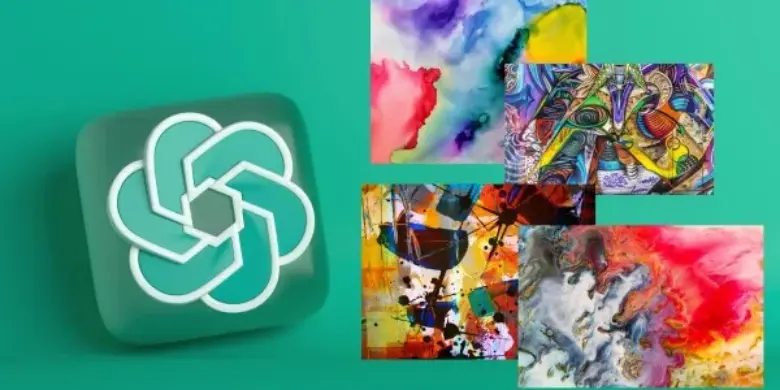
Image courtesy: Analytics Vidhya
8. Heuristic Evaluations via Vision API
A traditional heuristic audit can be time-consuming and repetitive. Checking every screen against Nielsen’s 10 Principles or Apple’s HIG is prone to human error. By the 50th screen, a designer’s ability to spot a 4px misalignment or an inconsistent back button behavior drops significantly.
Instead, use vision-API auditing to perform pre-flight checks. While tools like Baymard UX-Ray offer 95%+ accuracy for e-commerce, ChatGPT serves as an incredible general-purpose auditor for internal consistency. It flags visual tension, hierarchy issues, and system status violations across multiple screens simultaneously.
- The Strategy: Don't just ask for "problems." Ask for a Heuristic Scorecard (1-10) for each of Nielsen’s principles.
- Expert Insight: The AI identifies the "What" (the violation), but you provide the "So What" (the impact). Use the AI to generate a Severity Scorecard to prioritize your design backlog.
- The 2026 Prompt:
"[Upload 5 Mocks] Run a Heuristic Evaluation on these screens based on Nielsen's 10 principles. Flag any violations of 'Consistency and Standards.' Specifically, check if the primary action button changes style across different pages. Provide a 'Severity Rating' for each issue."
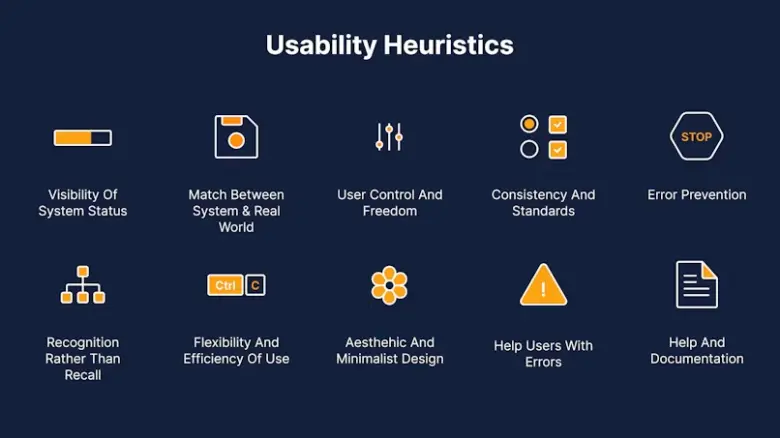
Image courtesy: Adam fard UX Studio
9. Creating Design Variables for Developers
Developer handoff is where the most friction occurs, and the design intent often gets "lost in translation. Telling a developer "it’s a light blue" leads to inconsistency. Manually documenting hex codes, spacing scales, and typography tokens is a tedious task that is highly susceptible to version-control errors and can be equated to data entry.
Utilizing tokenized generation to create a single source of truth, ChatGPT understands the technical structure of modern design systems. It can take your raw brand values and turn them into W3C-compliant JSON tokens which are basically reusable design values like your primary colors, spacing, and typography that stay consistent across the product. Developers can use these directly in code, so there’s less back-and-forth and fewer things getting lost in translation during handoff.
- The Workflow: Describe your visual variables in plain English. Ask ChatGPT to "Format as a W3C-compliant Design Token JSON."
- Strategic Advantage: Ask the AI to write the technical documentation for each token. This explains the logic behind the "Warning-600" red to a developer, ensuring they use it correctly in future components.
- The 2026 Prompt:
"Generate a JSON file for a design system. Use an 8px 'Spacing Scale'. Define 3 'Heading Levels' (H1, H2, H3) with 1.2x scaling. Include 5 semantic 'Success' greens and 5 'Error' reds. Ensure the naming convention follows 'sys.color.[sentiment].[level]'."

Image courtesy: Zenn
10. Simulating "User Friction" Before Testing
Traditional usability testing is slow and expensive. You often don’t find out a flow is confusing until you’ve already committed to the build. So the real question becomes: how do we quickly test our assumptions and spot friction before investing time and research budget?
The answer is persona simulation. We use ChatGPT to “inhabit” specific user mindsets - a frustrated parent, a first-time elderly user, or a skeptical executive. You then walk the AI through your flow, step by step. It often surfaces moments of friction or cognitive overload - points where the user is being asked to do too much at once.
- Expert Insight: Use this to "pre-test" multiple versions of a layout before deciding which one is worth testing with real humans.
- The 2026 Prompt:
"Act as a 'Technophobic User' trying to set up their first smart-home device. I will describe my 4-step onboarding flow. After each step, tell me: 1. What are you thinking? 2. What makes you nervous? 3. At which step are you most likely to quit and delete the app?"
Image courtesy: Medium
Designing UX with Integrity with ChatGPT
As we start relying more on AI, the role of a designer naturally shifts. It’s no longer just about making things look and work well but also about making sure the AI we use behaves responsibly. In 2026, that means thinking a lot more about the impact of what we’re building, not just the output.
One of the biggest challenges here is the “black box” problem. AI can generate answers, flows, and ideas instantly, but it’s not always clear how it got there. That’s where designers come in. We need to sense-check what’s being generated and make sure it actually makes sense for real users in real contexts.
- Transparency: People should know when they’re interacting with AI. It doesn’t need to be over-explained, but it shouldn’t be hidden either. A simple cue or label can go a long way in building trust.
- Bias Mitigation: AI reflects the data it’s trained on. If that data is limited, the output will be too. As designers, we need to question what we’re seeing—are these personas, suggestions, or flows actually inclusive, or are they skewed in subtle ways?
- Data Responsibility: AI runs on user data, which means we have to be more careful than ever about how that data is used. Clear consent, minimal data collection, and respecting user privacy shouldn’t be optional—they should be built into the UX design process.
At the end of the day, AI can speed things up, but it can’t take responsibility. That part still sits with us.
To Sum Up
As we’ve explored in this guide, many of the tasks traditionally handled by junior designers, like research synthesis, documentation, and creating first drafts, are now being automated by tools like ChatGPT. In 2026, your value as a UX professional is no longer tied to how fast you can move in Figma or how quickly you can produce a sitemap. Your value lies in orchestration.
By offloading the heavy lifting of synthesis and documentation to AI, you reclaim the time to do what you actually love: solving human problems. Check out this project by AND Learner, Vikas Sen, to get inspiration for your next UX Design project!
And remember, AI provides the Draft, but you provide the Discernment. When you allow the AI to do the heavy-lifting of data and documentation, you stay focused on the human lifting -strategy, empathy, and vision. Your taste and your empathy are your greatest competitive advantages.
If you find the idea of using ChatGPT for UX Design exciting, check out our UI UX Design courses, which are taught through live, interactive classes by industry experts. These courses will train you in how to leverage AI to create design processes that are fast, efficient, and scalable. Talk to our course advisors today to learn more!
Note: All information and/or data from external sources is believed to be accurate as of the date of publication.